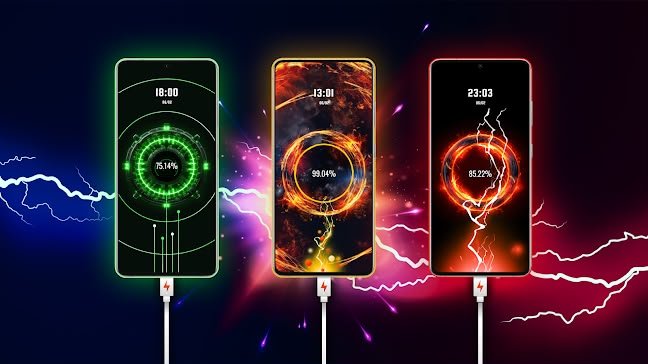

Battery charging photo animations are one of the new trends on social media including TikTok, Instagram Reels, Facebook, and YouTube Shorts. This creative effect creates the illusion that your phone is charging, bringing your photo to life with glowing energy, neon effects, and realistic charging animations. The end result looks futuristic, catches the eye and is perfect to capture the attention of viewers on social media.
In this tutorial, you will learn the process of creating a battery charging photo animation with the help of AI-powered editing tools and mobile apps. Even if you’re a beginner, you can still follow these simple steps to create a professional looking animation.
What is a Battery Charging Photo Animation?
A battery charging photo animation is a visual effect in which a static image is combined with a charging interface animation. The battery icon fills from 0% to 100%, with glowing light effects, electric particles and motion graphics bringing the photo to life.
This trend is widely used by content creators to showcase profile pictures, portraits, gaming images, wallpapers and AI-generated images.
What Makes This Trend So Popular?
Battery charging animations are a big hit because they instantly grab the eye. The animated battery percentage and glowing effects attract viewers to stay until the animation ends, thereby increasing watch time and engagement.
Here are some of the best reasons creators love this effect:
Easy to create with AI tools.
Looks professional with little effort.
Good for short form videos that go viral.
Good for profile and personal branding edits.
Good for TikTok, Instagram, Facebook, YouTube shorts.
Pick a Nice Photo
The quality of your end animation depends on the image you use. A good lighting and a clear high resolution portrait will always give the best results.
For a better visual:
Choose a portrait photo with a simple background.
Choose a photo with sharp detail.
Make sure your photos aren’t blurry or low-res.
Use an AI image enhancer to improve the photo, if needed.
Add the Battery Charging Effect
Once you have your photo, upload it into your favourite editing app.
Add a battery charge overlay that includes:
Battery schematic
Charging %.”
Animation of charging cable.
Green charging light.
Glow. electric.
Neon lights.
Charging pulse effect.
Most editing apps feature pre-built battery charging templates that can be edited in a few taps.
Effects of glow and energy
Make the animation more realistic, by adding glowing effects around the battery icon and the photo.
Typical effects include:
Neon signs.
Sparks of electricity.
Blue energy waves.
Particles of lightning.
Pulse Anim.
Lens flares.
Leaking light.
These effects create an illusion that the battery is actively charging.
Make Battery Percentage Come Alive
Charging percentage is one of the most important factors of this trend.
A typical sequence is as follows:
1% 10% 25% 50% 75% 90% 100%
The smooth animation of the battery percentage makes the video more realistic and more satisfying to watch.
Add Camera Movement
Add a little camera motion, instead of keeping the image totally static.
Popular animations are:
Slowly zoom in.
Zoom out
A little twist.
Push activated.
Moving around in the air.
Cinematic pan.
The animation feels a lot more lively with small movements.
Background Music
Music is an important part of short videos to make them engaging.
Choose music to match the futuristic charge theme.
Popular choices include:
Electronic beats.
Synthwave.
Music: Cyberpunk.
Bass hits.
Trending TikTok sounds.
Instrumental EDM
Make the battery charging progress in sync with the music beat for a more fluid experience.
Export High quality
When your animation is finished, export it at the highest quality possible.
Recommended export settings are:
Resolution: 1920×1080 (Vertical).
Frame Rate: 30 or 60 FPS
Aspect Ratio: 9:16
High Bitrate for best quality
These settings are perfect for TikTok, Instagram Reels, Facebook Reels, and YouTube Shorts.
Suggestions for Improved Results
To make your animation for charging battery different:
Use bright images of high quality.
Keep the animation between 8 and 15 seconds.
I’ve been working on this for a while, and I’m really excited about what we’ve been able to build. We’ve got a great team here, and we’re all really passionate about this project. I think it has the potential to be a game-changer.
No flashy visuals.
Synchronize animations with background music.
Add bright colors and lighting.
Exporting the video after playing it.
Simple clean animations tend to do better than overly complicated edits.
Battery Charging Photo Animations Best Uses
You can apply this effect to many types of content, including:
Videos for social media profiles.
Instagram Reels.
TikTok edits.
Shorts on YouTube.
Introductions to gaming profiles.
AI portraits on show.
Digital Wallpaper.
This is an advertisement.
Personal Branding Video.
The visual satisfaction of animation often makes it more engaging than static images.
Judgment
Battery charging photo animations are a cool way of transforming simple photos into eye-catching videos. Today, with AI editing tools and mobile apps, anyone can create stunning charging effects with glowing batteries, animated percentages, and cinematic motion.
If you’re making content for TikTok, Instagram, Facebook or YouTube Shorts, this trend is a great way to get attention and increase engagement. Great photo, seamless animations, creative lighting and the right music, you can create professional battery charging animations that pop on every platform.