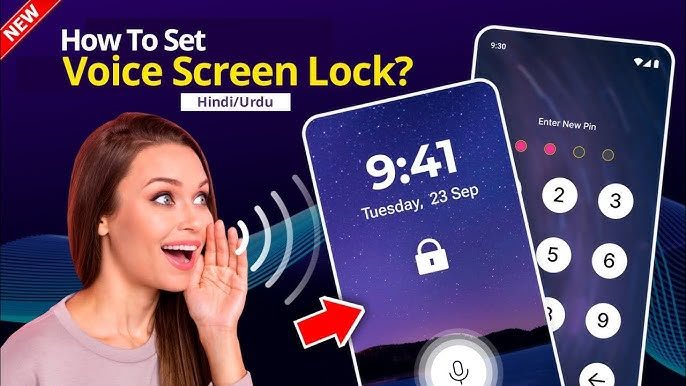

Smartphone security is more important than ever. We keep our personal photos, banking apps, social media accounts, emails and important documents on our devices. PINs, passwords, patterns and fingerprints are the most common traditional screen locks but nowadays many users are opting for more sophisticated and convenient security options. One such innovative method is Voice Screen Lock.
A Voice Screen Lock allows users to unlock their smartphone using a specific voice command or passphrase. This modern feature gives you a hands-free way to access your device, offering a blend of convenience and security. In this article, we’ll describe what a Voice Screen Lock is, how it works, its pros and cons, and tips on how to use it safely.
What is a Voice Screen Lock?
A voice screen lock is a security feature that allows you to set a personalized voice password to unlock your device. This feature can be useful if you have trouble remembering traditional passwords or if you want to add an extra layer of security to your device. To set up a voice screen lock, follow these steps: 1. Open the Settings app on your device. 2. Tap on “Security & Emergency.” 3. Tap on “Screen Lock.” 4. Tap on “Voice.” 5. Follow the on-screen instructions to record your voice password. Once you’ve set up your voice screen lock, you are able to unlock your device by saying your voice password. If someone tries to unlock your device with a different voice, the device will not unlock.
A Voice Screen Lock is a security option that enables users to unlock their smartphone by saying a certain phrase, rather than entering a PIN or drawing a pattern. Setup captures your voice and after that compares voice inputs to the stored voice pattern. The device or app will unlock if the voice is a match.
Many Android apps offer voice-based locking features, and some smartphones also have voice authentication as part of their security options. Not all devices have the built-in voice unlock, but you can try the technology with third-party apps.
How voice lock screen works?
Voice recognition technology uses artificial intelligence (AI) and machine learning to analyze your voice. It recognizes your spoken words, and also looks at features such as your tone, pitch, pronunciation, speaking style, and so on.
The basic process consists of:
Set up or turn on a voice screen lock feature
Record a voice passphrase of your choice.
Securely store the voice sample.
Say the same phrase when you unlock the device.
The system compares your current voice to the stored sample.
If the match is successful, the device will unlock.
Some advanced voice recognition systems can even distinguish between the owner’s voice and someone trying to mimic it.
Benefits of Using a Voice Screen Lock
Voice Screen Lock has some advantages that make it attractive to a lot of smartphone users.
Convenience – Hands free
One of the biggest pluses is convenience. It allows you to unlock your phone without touching the screen, so it’s useful when you’ve got wet, dirty or occupied hands.
Security customized
Because each person’s voice is unique, voice authentication provides a higher degree of personalization than simple PINs.
Fast Access
For people who unlock their phones often throughout the day, saying a short passphrase might be quicker than typing a long password.
Modern User Experience
It makes your device feel futuristic and shows how AI is improving everyday smartphone interactions with voice recognition.
The cons of voice screen lock
Voice Screen Lock has its advantages but there are some drawbacks to its use.
Background Noise
In noisy environments, the system may have difficulty hearing your command accurately, which can affect the voice recognition.
Change in the Voice
Voice recognition performance may be temporarily affected by sore throat, heavy coughing or illness.
Security problems
Basic voice lock apps are vulnerable to high quality voice recordings. More sophisticated systems use AI-based voice biometrics to mitigate this risk but voice authentication can’t always be as secure as fingerprint or facial recognition.
Device Compatibility
Not all smartphones come equipped with voice unlock functionality. Device and application features and performance can vary.
Voice Screen Lock and Conventional Screen Locks
Each unlocking method has its own advantages.
PIN Lock
Easy to setup.
Reliable.
Manual input required.
Lock Pattern.
Quick and easy.
Easy to recall.
Sometimes can be inferred from smudges on the screen.
Lock with Fingerprint
Quick and very secure.
Works in most light conditions.
Fingerprint reader needed.
Face Unlock (Face Recognition)
Touch-free and convenient.
Performance is dependent on camera quality and lighting.
Voice lock screen
Hands free and easy to operate.
User-specific.
May be difficult in noisy environments or when your voice changes.
Many users use Voice Screen Lock together with other authentication methods to improve security.
Tips to Improve Voice Recognition
For better accuracy of your Voice Screen Lock, we recommend the following:
- Record your voice in a quiet place.
Set it up talking normally.
Pick a unique passphrase.
Avoid very short, very common phrases.
If your voice recognition fails, re-record your voice.
Keep your mic clean for better sound quality.
These few simple steps can greatly improve voice recognition performance.
Is Voice Lock Safe?
Voice Screen Lock provides a decent level of security for everyday use, but it should not necessarily be the only protection for extremely sensitive information. If you keep banking apps, sensitive documents or business data on your phone, consider using voice recognition with stronger authentication measures such as fingerprints, facial recognition or a secure PIN.
Even if one of the authentication methods fails, multiple layers of security can help keep your device secure.
Smartphone security best practices
Whether you use Voice Screen Lock or some other way to unlock your device, it’s important to develop good security habits:
Choose a robust backup PIN or password.
Enable biometric authentication where possible.
Update the software on your mobile.
Download from trusted sources only.
Check app permissions regularly.
Use Find My Device or similar tracking features.
Do not share your unlock phrase with anyone.
Back up important data often.
You can use these steps to help protect your personal information.
Who is Voice Screen Lock for?
Voice Screen Lock is perfect for those who love new technology and want a simple hands free way to unlock. It can also be helpful for people who are often multi-tasking, or for people who need to get on their phones quickly and hands free.
However, those who value security above all should think of Voice Screen Lock as an added convenience, not as a full replacement for stronger forms of authentication.
Conclusions
Voice Screen Lock is a new feature that uses artificial intelligence and voice recognition to lock your smartphone. It allows users to unlock their devices with a personalized voice command, providing a quick, convenient and futuristic experience. It may not be a substitute for traditional security for everyone, but it is a great additional option for everyday use.
As voice recognition technology continues to improve, Voice Screen Lock is expected to become more accurate, reliable and secure. If you’re looking for a bit of extra convenience or just want to play around with the latest in smartphone technology, Voice Screen Lock is a cool new thing to check out.